

























Policies and contracts
Policy lives on the controller. Agents receive the policies that match their containers and cache resolved assignments. A controller outage can be tolerated while the current tokens remain valid.
Controller settings
Open Settings in the web admin navigation to inspect the controller settings
loaded at startup. The page shows listen addresses, session lifetime, state
directory, the enabled or disabled local-agent.enabled flag, OpenBao
namespace and mounts, operator admission groups, and update check settings.
It uses the same operator sign-in requirement as other admin
pages. Agent configuration remains on each agent host.
This view is read-only. Edit the controller YAML configuration and restart the controller to apply changes. Credentials, AppRole RoleID, and credential-file paths are omitted from the page data. Endpoint origins show only scheme and host; URL userinfo, paths, queries, and fragments are omitted.
Policy document
name: teal-devcontainer
openbao:
  agent-token-renewal: true
  policy: |
    path "kv/data/teams/teal/*" { capabilities = ["read"] }
ssh:
  transit-keys:
    - teal-github
  ca-roles:
    - homelab
contract:
  mount-target: /run/wyrwood
  env:
    SSH_AUTH_SOCK: "{mount-target}/ssh-agent.sock"
    VAULT_ADDR: "unix://{mount-target}/vault.sock"
The controller validates the HCL through OpenBao before saving and writes it
as wyrwood-teal-devcontainer. Every Transit key and SSH role the policy
names must exist under the controller’s configured mounts and must also be
permitted by the HCL.
Policy editor
The graphical editor adds paths and selects their capabilities. Browse KV
paths lists names in the configured KV v2 mounts. Select a secret to add its
data/ path, or a directory to add its subtree. Add LIST path for this
directory adds a metadata/ grant for the workload. Custom paths accept
wildcards and paths outside the browsed mounts. KV names with ACL wildcard
or template meaning cannot generate automatic grants; enter their intended scope
manually in raw HCL. Graphical path fields direct template syntax to the raw editor.
Raw HCL exposes the full document. Switching views preserves its text. HCL with constructs the graphical controls cannot represent, including parameter constraints, legacy policy attributes, or inline comments inside a path block, opens as raw HCL. It remains editable and is validated by OpenBao on save. Graphical edits change only the selected path or capability span; other text and comments are retained. Advisory warnings appear beside either view and do not block saving.
Agent token renewal controls actual renewal of the binding token by the
agent. The controller adds fixed lifecycle grants when publishing each named
policy: lookup-self uses read, retirement uses revoke-self update, and
renew-self uses update when enabled. The graphical editor keeps these paths
out of ordinary path editing. Exact lifecycle stanzas in raw HCL are replaced
by the managed grants; workload paths and their constraints remain authored.
The lifecycle preview shows the resulting grants. New policies enable renewal.
For stored documents without openbao.agent-token-renewal, Wyrwood infers the
choice from the existing renewal capability, including literal, wildcard,
legacy policy attributes, and deny/path priority. An explicit setting overrides
those authored lifecycle stanzas. Disabled renewal uses an empty exact rule so
that a broader workload path cannot grant it; an enabled selected policy can
still contribute update on the same exact path.
Container lookup forwards the real binding token to OpenBao and returns safe metadata, including its accessor, policies, and remaining TTL. The response omits the token value. Container renew-self is answered locally using lookup metadata and a placeholder credential; it never renews the real token. Container revoke requests are blocked. The agent owns actual renewal and revocation.
Transit keys and SSH-engine roles have independent offered and not-forwardable selections. Saved names remain visible when an item is missing or OpenBao cannot list it. Add identity name accepts a name that is not in the list, including a forwarding selector for an identity another policy offers. An offered identity must exist in OpenBao.
Environment requirements use name/value rows. TTL fields use an amount and a unit: minutes or hours on a binding, seconds/minutes/hours for SSH role creation.
Access group
The binding form offers groups reported by the running host agent, with numeric
GIDs and host names when available. Numeric GIDs are authoritative. The choices
include the effective primary group and supplementary groups, plus owner-only
access. An agent with effective Linux CAP_CHOWN can also assign another numeric
GID. The server rejects groups excluded by the current agent report, including
stale form posts.
For offline or older agents, the form marks capability information unavailable or stale and preserves the existing group as unverified. It does not replace an invalid saved choice. Select a reported group or owner-only access to correct it. Add the host agent user to another group and restart the agent, then reload to see its new report. Account changes alone do not change a running process.
The container application must retain the selected numeric group as a primary
or supplementary group; its primary GID need not match. An entrypoint such as
s6-setuidgid can rebuild groups from the container account database and discard
groups supplied only through Compose group_add. Check the application process,
not only PID 1. The host dropdown does not prove container application access.
The binding’s settings.access-group is effectively required for non-root
containers whose
processes run as a different UID from the host agent user. Set it to a numeric
host GID that the container processes have as a primary or supplementary group.
With an access group, the consumer directory is 0750 and sockets are 0660.
Without one, they are 0700 and 0600, owned by the agent user. A container
running as another non-root UID cannot use those owner-only sockets.
The agent user must belong to the host group so it can assign that group to
the directory and sockets. Add wyrwood to the consumer access group;
docker cannot serve as that group. For example, if the binding uses
GID 1000, find its host group name, add the agent user, and restart the agent
so it receives the new membership:
getent group 1000
sudo usermod -aG <host-group-name> wyrwood
sudo systemctl restart wyrwood-agent
Replace <host-group-name> with the name returned by getent. If the GID has
no host group, create one with that GID first. Repeat on each bound host.
The packaged service identity is wyrwood; the proxy accepts that UID and root.
Membership grants access: members of that host group who can reach the consumer directory can use its sockets with the binding’s OpenBao and SSH permissions. Choose a group whose members you trust with those permissions.
Token lifetime
token-ttl is the initial token lifetime; token-max-ttl, at least as long,
is its maximum lifetime. When any selected policy enables Agent token
renewal, the agent renews at half the remaining TTL and requests fresh
credentials when renewal fails or the maximum lifetime caps a renewal.
When all selected policies disable renewal, the agent makes no renewal requests. It keeps the token until expiry, stops serving it, and requests a replacement credential from the controller using the existing retry backoff. A successful replacement stops those retries. Retirement cancels the pending expiry and retries. If the controller is unavailable at expiry, secret access stops until a new credential arrives. Container renew-self cannot extend this lifetime. The maximum lifetime bounds a renewing token during a controller outage; the initial TTL bounds a non-renewing token.
Follow the stopped controller-first rollout. Agents remain stopped until both peers are upgraded. Updated agents accept assignments without the field and infer their existing renewal choice. The controller sends the resolved choice in effective assignments; older agents reject this unknown field. No policy data conversion is required.
Bindings
A binding attaches one or more policies to one container key on one agent. Keys are tried in order: devcontainer identity labels, compose project and service labels, container name. Token lifetime, access group, and enforcement are binding settings, independent of the reusable policies:
{
  "policies": ["teal-devcontainer", "shared-read"],
  "settings": {
    "token-ttl": "1h",
    "token-max-ttl": "8h",
    "access-group": 1000,
    "enforcement": "report"
  }
}
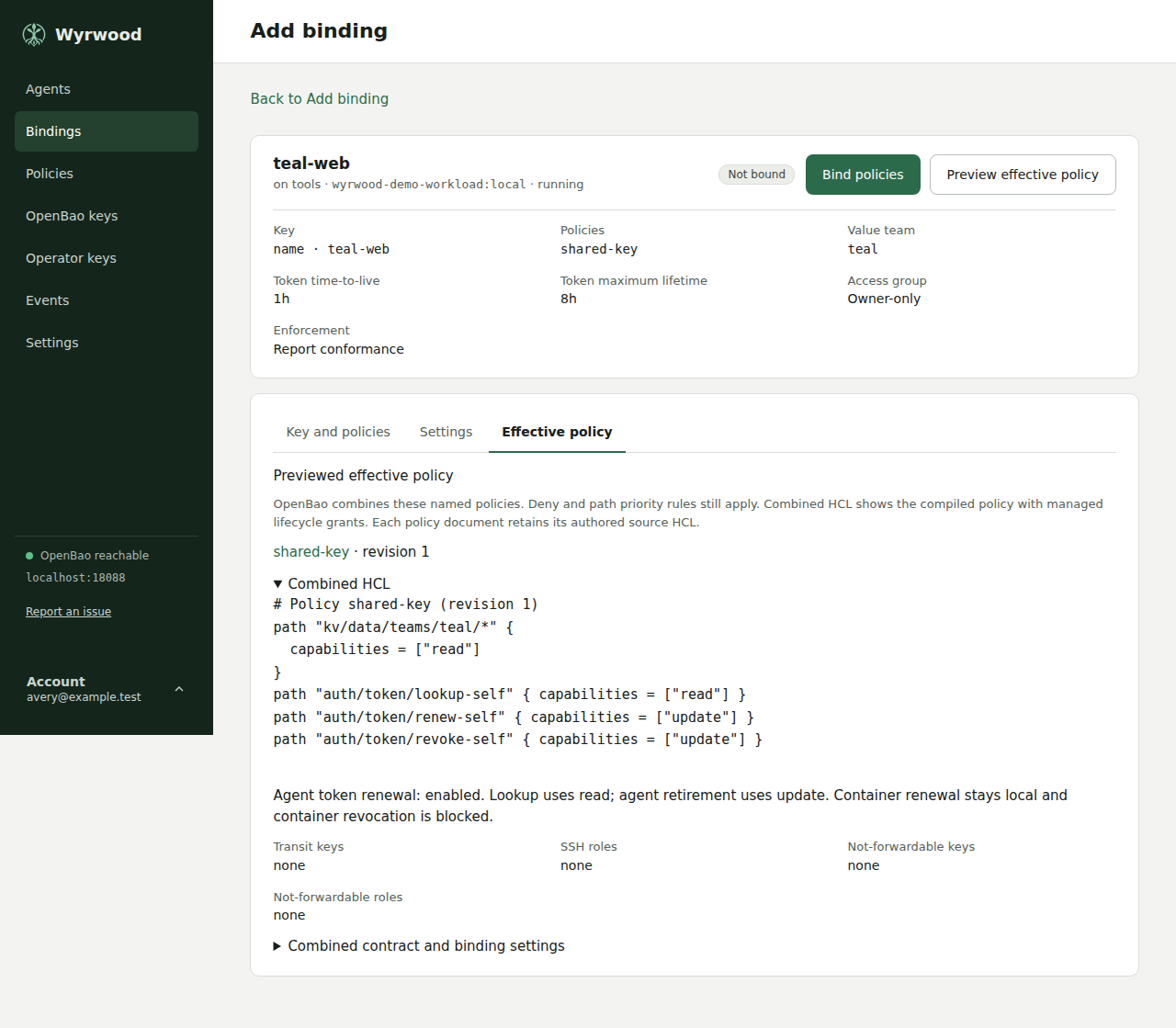
The web interface selects policies with checkboxes. Preview effective policy shows source names and revisions, combined HCL, offered identities, forwarding restrictions, contract, and settings before saving. Binding edits submit the current revision; a stale edit must be reloaded.
Values for each binding
To give many containers the same rule over different paths, write
{{binding.name}} in a path stanza of one policy:
path "kv/data/sample/keys/{{binding.slug}}" {
  capabilities = ["read"]
}
The binding screen then asks for slug, under the selected policies. Each
binding holds its own value:
{
  "policies": ["sample-key"],
  "settings": { "values": { "slug": "alpha" } }
}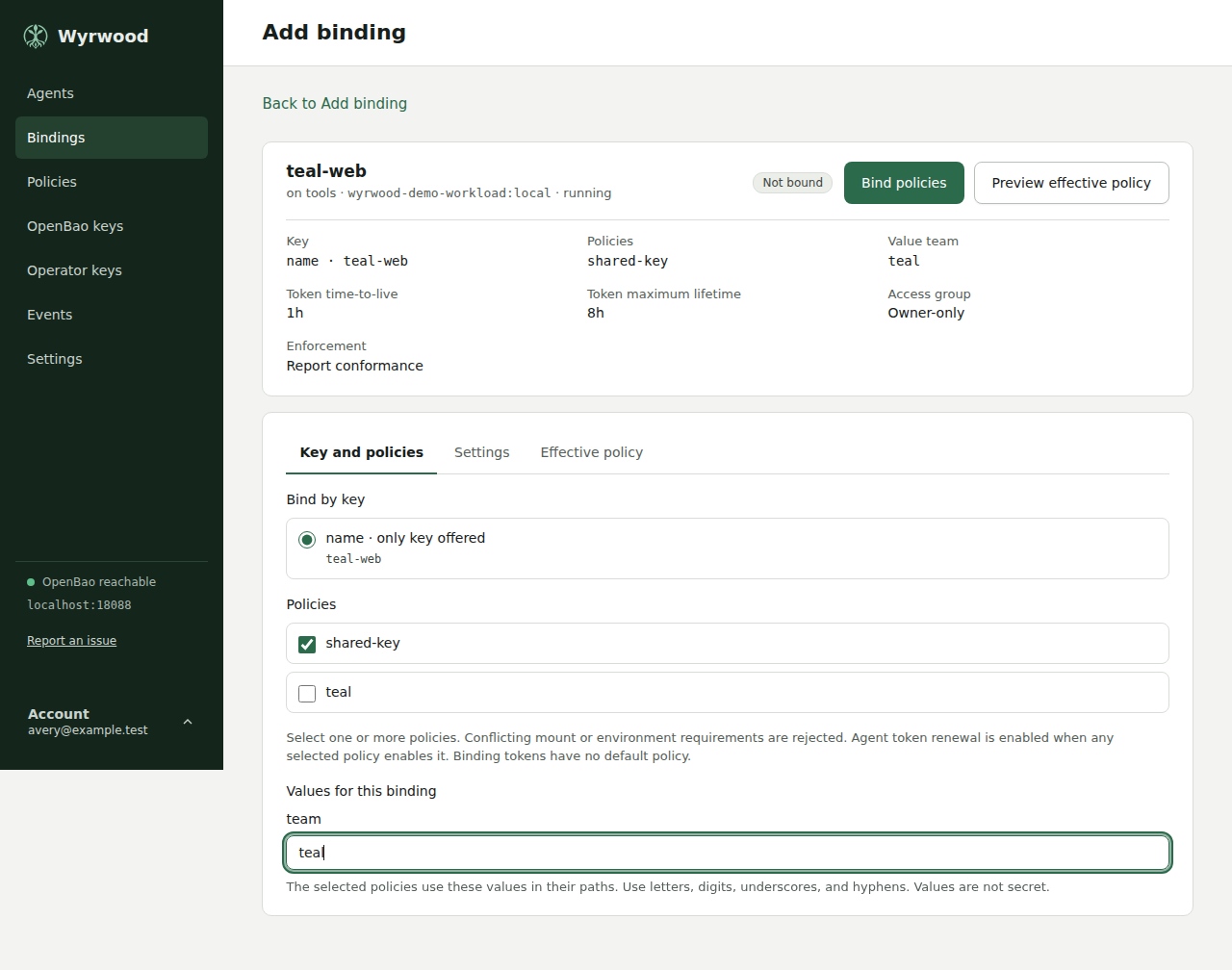
A token of this binding reads kv/data/sample/keys/alpha and no other key under
that path, and Preview effective policy shows the path with the value in it.
No policy is written for each container.
A name holds lower-case letters, digits, and underscores, and starts with a letter. A value holds up to 128 letters, digits, underscores, and hyphens, so it cannot add a wildcard or a path segment. Values are not secret: OpenBao holds them in identity metadata, and a token can read its own. Placeholders work only in path stanza names, and saving a policy that has one elsewhere is refused.
A saved value that no selected policy uses stays on the binding screen as an optional field. It has no effect, and clearing it removes it. Saving a binding with no value for a placeholder is refused. Editing a policy to add a placeholder is refused while a binding that selects the policy has no value, and the message names that binding. To move bindings to a placeholder, create a new policy that has it, select that policy on each binding with its value, and then delete the old policy. Changing a value is a new assignment, so the agent gets a new token and the old token is revoked. No OpenBao policy or controller permission changes are needed.
How OpenBao combines policies
HCL remains in separate OpenBao policies. OpenBao evaluates their union with
its normal path priority and deny rules; the displayed HCL includes each
source in stable name order. Transit keys and SSH roles are deduplicated
separately. A not-forwardable selector in any source restricts the selected
identity. Sources must require the same mount target. Environment entries
are merged after expanding {mount-target}; different values for one name
are rejected. A conflicting source edit is rejected before saving.
The controller creates one AppRole per binding carrying exactly the OpenBao
policies of the selected policies, wyrwood-<policy-name> on the first use of a
name. It disables the implicit default policy;
each named policy contains the fixed and settings-derived lifecycle grants.
Renewal is enabled for a composed binding when any selected policy enables it.
The effective preview includes the compiled lifecycle grants and the resolved
agent-renewal setting. OpenBao still evaluates workload ACL rules, including
wildcards and deny precedence.
Changing the selected policies, a source revision, or binding settings creates a new assignment. The controller updates the AppRole and revokes the reported old token before issuing fresh credentials. An offline agent’s containers lose access until the agent reconnects. A failed transition remains pending and blocks fresh issuance; startup and subsequent credential requests attempt the pending transition. An unreported token remains bounded by its maximum TTL. Late old-assignment accessor reports are revoked rather than saved as current.
Deleting a binding deletes its AppRole and revokes the reported token even while the agent is offline. If revocation fails, the response says that the token can remain valid until the agent revokes it or it expires.
Contract enforcement
report is the default. The agent checks the mount, the environment names and
values, and the access group on every reconcile and reports what is missing.
recreate makes the agent apply the contract once, when the binding is first
bound to a container. For a name binding that can be after the binding
exists, and the agent then does not need the controller. The agent stops,
removes, and creates the container from its inspected definition with the mount
and environment merged in. Later drift is reported, not recreated. The host’s
agent configuration must also allow recreate; otherwise the binding is reported
as non-conforming with that reason.
Agent configuration
/etc/wyrwood/agent.yml holds only what is needed to reach the controller
and the engine:
controller:
  url: ssh://controller.example.internal:2222
engine:
  socket: /var/run/docker.sock
  proxy-socket: /run/wyrwood-engine/engine.sock
  allow-recreate: false
engine.socket is the proxy’s upstream; the agent uses engine.proxy-socket.
The proxy reads the root-controlled file itself. Set allow-recreate: true
only when arbitrary create authority on this host is acceptable: a
compromised agent can still take over a recreate-enabled host. Activate any
change with sudo systemctl restart wyrwood-agent.service, which restarts
the proxy too. Both configuration paths and custom proxy socket directories
must meet the protected ownership rules described in Installation.
The agent key, accepted controller fingerprint, cached policy, events, and
the journal of each recreate in progress live under /var/lib/wyrwood. No
token or secret is ever written there.
Controller configuration
/etc/wyrwood/controller.yml names the listen addresses, the state
directory, the OpenBao connection, and the OpenID Connect provider operators
sign in through. The AppRole secret identifier and the client secret are read
from files:
http:
  listen: 127.0.0.1:8080
  session-ttl: 12h
ssh:
  listen: 0.0.0.0:2222
openbao:
  address: https://openbao.example.internal:8200
  namespace: wyrwood
  approle:
    role-id: REPLACE_WITH_ROLE_ID
    secret-id-file: /run/secrets/openbao-secret-id
  transit-mount: transit
  ssh-mount: ssh
  secret-mounts:
    - path: kv
      type: kv-v2
    - path: certificates
      type: other
oidc:
  provider-name: Pocket ID
  issuer: https://id.example.internal
  client-id: REPLACE_WITH_CLIENT_ID
  client-secret-file: /run/secrets/oidc-client-secret
  redirect-url: https://wyrwood.example.internal/auth/callback
  groups-claim: groups
  allowed-groups:
    - wyrwood-operators
openbao.secret-mounts is an optional catalog of expected secret engines,
empty by default. Each entry has a unique path inside the namespace, without
slashes, and a type of kv-v2 or other. Paths use letters, digits, dot,
dash, and underscore; dot-only and double-dot paths are invalid. OpenBao’s
reserved roots sys, auth, identity, cubbyhole, and audit cannot be
secret mounts. The catalog
supports policy warnings and editor path pickers. It creates no mounts and
changes no OpenBao permissions.
Register the controller with the provider as a confidential client using the
authorization-code flow with PKCE, with the redirect URL above. The URL is the
public address behind your reverse proxy, not the loopback listen address.
The provider must include group membership in the ID token, which Wyrwood
requests with the groups scope. An account is admitted only when one of its
groups is listed under allowed-groups; the web interface cannot change the
list.
Release checks
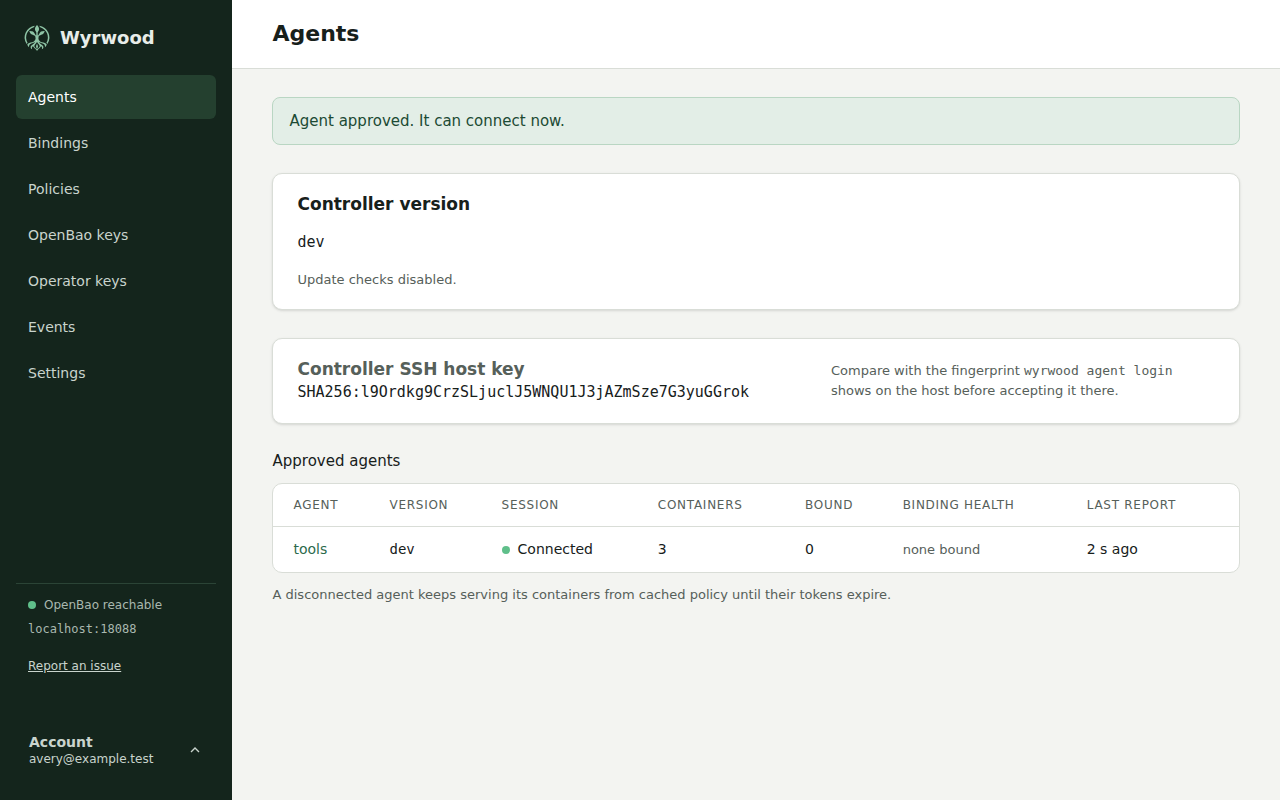
The Agents page shows the controller build version and each approved agent’s version. An agent older than the controller is marked Out of date. An agent that omits its version can still connect and shows unknown with Update available. Development builds remain visible; they are not compared as release versions.
Release checks are disabled by default. To enable outbound HTTPS requests from
the controller to GitHub, add this to controller.yml and restart the controller:
update-checks:
  enabled: true
  interval: 24h
  timeout: 10s
interval and timeout are configurable positive Go durations, such as 6h
and 20s. There is no additional interval floor or timeout ceiling beyond a
positive duration that Go can represent. Choose an interval appropriate for
external release checks; very short intervals increase requests to GitHub.
The defaults are 24 hours and 10 seconds. An enabled controller checks
at startup, then waits the configured interval after each attempt. The timeout
bounds each complete check. Checks run in the background, without blocking
startup, agent sessions, or pages. Failed checks wait for the same interval;
there is no immediate retry.
The controller reads the public wyrd-company/wyrwood/releases/latest redirect
using an HTTP client, without the GitHub API or a credential. It compares the
release tag with its build version using SemVer, including prereleases and build
metadata. The page shows Update available with the release link when a newer
release exists. Up to date requires a successful check and a comparable build
version.
For an offline or air-gapped controller, leave enabled false or omit
update-checks. No release request is made. If an enabled check fails, the page
shows Update check unavailable, writes a fixed failure category to the
controller journal, and retains the last successful result with
its age. Observations are held in memory and start empty after a restart.
Policy path warnings
The policy editor checks HCL path stanzas against the configured AppRole,
Transit, SSH, and secret-engine mounts, plus the exact auth/token/lookup-self,
auth/token/renew-self, and auth/token/revoke-self paths. A path such as kv/*
or kv/data/+/entry stays inside a configured kv mount; kv*, +/data/*,
auth/+/role/*, and sys/* can reach outside the configured mounts and produce
an advisory warning. The check reads path stanzas, including deny stanzas; it
does not evaluate effective OpenBao capabilities or path priority.
Checks run when the editor opens and when you leave the HCL field. A warning,
unreadable HCL, or an unavailable warning check never blocks saving. OpenBao
validates the HCL on save. An outside grant can be intentional; list a secret
engine in openbao.secret-mounts when it is part of the expected scope.
OpenBao namespace
The controller runs in a dedicated OpenBao namespace. OpenBao does not limit the HCL a token writes to the capabilities that token holds, so the controller, and any operator, can grant every access in the namespace the controller runs in. A dedicated namespace keeps that access inside Wyrwood.
The namespace holds:
- the AppRole auth mount the controller and binding AppRoles use
- the controller’s own policy and AppRole
- the Transit and SSH-engine mounts the controller manages
- every secret engine containers read, for example KV
Paths in policies are relative to the namespace, so a policy names
kv/data/..., not wyrwood/kv/data/.... Set openbao.namespace to the
namespace path; the controller, the agents, and the container vault sockets
all send it.
Name the controller’s own policy and AppRole outside the wyrwood- prefix,
for example controller. The controller writes only wyrwood- names, so it
cannot rewrite its own policy or AppRole. Every binding AppRole carries only
its selected wyrwood- policies and no implicit default policy.
The controller’s policy, for a kv-v2 secret-mount entry at kv and the
default approle, transit, and ssh mounts:
path "sys/policies/acl/wyrwood-*" {
  capabilities = ["create", "read", "update", "delete", "list"]
}
path "auth/approle/role/wyrwood-*" {
  capabilities = ["create", "read", "update", "delete", "list"]
}
path "auth/approle/role/wyrwood-*/role-id" { capabilities = ["read"] }
path "auth/approle/role/wyrwood-*/secret-id" {
  capabilities = ["create", "update"]
}
path "sys/wrapping/wrap" { capabilities = ["update"] }
path "kv/metadata" { capabilities = ["list"] }
path "kv/metadata/*" { capabilities = ["list"] }
path "transit/keys" { capabilities = ["list"] }
path "transit/keys/*" { capabilities = ["create", "read", "update", "list"] }
path "ssh/roles" { capabilities = ["list"] }
path "ssh/roles/*" { capabilities = ["create", "read", "update", "list"] }
path "auth/token/renew-self" { capabilities = ["update"] }
path "auth/token/revoke-accessor" { capabilities = ["update"] }
Change the mount names in the paths when you configure other mounts. The controller revokes only the token accessors its agents report.
The editor browses only kv-v2 entries from openbao.secret-mounts. The list
is empty by default; free-text paths and raw HCL remain available. Browsing
requires a non-root namespace. Grant only list on each configured KV v2
mount’s metadata and metadata/* paths in that namespace, as shown for kv
above. Entries of type other do not get KV LIST grants or appear in the
picker. The controller does not read KV metadata or data values, write KV
data, or list sys/mounts for the editor. A denied or unavailable list shows
a warning without blocking manual editing.
Controller local agent
Set local-agent.enabled: true in the controller document to run the shared
agent runtime inside controller serve. It defaults to false. Agent settings
remain in /etc/wyrwood/agent.yml; enrollment and local commands retain the
standard agent state and runtime paths. Follow
Controller with a local agent
for the Linux service setup and approval steps.