

























Policies and client keys
Every client authenticates with its own client key (xol_...). Every key
belongs to a policy. The policy decides what the key can do.
Write a policy
- Open Policies in the web UI and select New policy.
- Enter a Name and a Description, and pick the Scopes. The default, proxy, lets keys use the LLM endpoints. Add mcp (MCP gateway) if the keys use MCP servers. See Scopes.
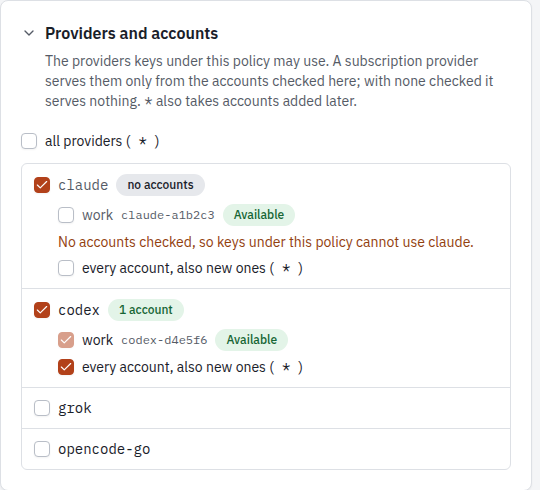
- Under Providers and accounts, pick the providers the keys can use and, for each subscription provider, the accounts that serve them.
- Set the models, the MCP servers and the rate limits. Each section folds away.
- Select Create policy. Later changes take effect when you select Save policy.
The editor warns when a subscription provider has no accounts: the provider looks allowed, but its requests get a 403.
The model list has two modes. Rules edits the rules in order, the default for other models, and the aliases. Effective models shows every model of the allowed providers as the policy decides it, with a switch per model, inline renames, the winner of each shared name, and the state of the accounts the policy uses. See Policy model list.
With the CLI
A policy is a TOML or JSON file, with the same fields as the editor:
name = "devcontainer"
description = "Coding agents in devcontainers"

providers = ["claude", "codex", "grok", "opencode-go", "vercel"]
rules = [
  { allow = "codex/gpt-6-codex" },
  { deny = "*-preview" },
]
precedence = ["claude", "codex", "grok", "opencode-go", "vercel"]

[accounts]
codex = ["codex-1a2b3c4d5e"]
claude = ["*"]
grok = ["*"]
opencode-go = ["*"]

[models]
"codex/gpt-6-codex-mini" = false

[winners]
"kimi-k3" = "vercel"

[renames]
"opencode-go/claude-haiku-5-5" = "haiku-go"

[aliases]
"fast" = ["codex/gpt-6-codex-mini", "vercel/openai/gpt-6-mini"]

[limits]
requests_per_minute = 60
tokens_per_day = 5000000
xolotl policies put devcontainer.toml
xolotl policies list
xolotl policies get devcontainer
xolotl policies delete devcontainer # refused while keys use itA model’s switch in the editor writes models.
| Field | Meaning |
|---|---|
name | Lowercase letters, digits, - and _, at most 63 characters |
description | Free text |
providers | Providers the key can use: claude, codex, grok, opencode-go, provider account names, or * for all |
accounts | Per subscription provider, the accounts that serve the keys, or ["*"] for every account, also accounts added later. See Accounts |
rules | Allow and deny globs on model or provider/model, in order: { allow = "…" } or { deny = "…" }. The first that matches decides. See Model names |
models | provider/model → true or false, for models no rule matches |
deny_other_models | true denies a model that no rule matches and models does not list. Default false |
precedence | Provider order for a model name that several providers serve |
winners | Per-model provider choice, before precedence |
renames | provider/model → the name keys see instead of its plain name |
aliases | Extra names. Each maps to one provider/model, or to a list tried in order |
scopes | What the key can do. Default ["proxy"] |
mcp_servers | MCP servers the key can use through /mcp, or * |
allow_tools, deny_tools | Globs on tool or server/tool. Deny wins. See MCP gateway |
key_policies | With the keys scope, the policies whose client keys the key can manage. See Issue keys from a script |
limits | Request and token limits on the LLM endpoints, also per provider and per account. See Rate limits |
Scopes
| Scope | Allows |
|---|---|
proxy | The LLM endpoints (/v1/...) and the passthroughs |
mcp | The MCP gateway at /mcp |
management | The T3 Code hubs endpoints (/v0/management/...) |
keys | Issue, revoke, disable and list client keys under the policies in key_policies |
admin | The admin API, the same as the bootstrap admin token |
A policy that allows MCP servers or lists key_policies needs no providers.
Accounts
A subscription provider serves a policy’s keys from the accounts listed under
accounts:
[accounts]
codex = ["codex-1a2b3c4d5e", "codex-f6a7b8c9d0"]   # only these two
claude = ["*"] # every account, also new ones- A provider without an entry has no accounts: its requests get a 403. An empty list is the same as no entry. In the web UI, a provider you turn on starts with the accounts it has now.
- Saving a policy still succeeds in that case, but tells you.
xolotl policies putprints a warning to stderr,PUT /admin/policies/{name}adds awarningslist to its answer, and the web UI’s policy editor shows the warning under the provider.PUTignoreswarningsin its input, so a saved answer can be sent back. Each warning names one subscription provider.providers = ["*"]allows them all, so it warns for each one with no entry. A policy whose scopes don’t includeproxyoradmingets no warning, as its keys call no provider. xolotl accounts listshows the account IDs.- When none of the listed accounts exists, a request gets a 403. When the listed accounts are disabled, cooling down or at a limit, the pool answers as it does for a pool with no usable accounts.
Policies from before 0.4.0
Version 0.4.0 replaced allow_models and deny_models with rules, and added
accounts. Xolotl migrates a stored policy that has either old field each time
it loads the policy, with the same effect:
- Each
deny_modelsglob becomes adenyrule, followed by eachallow_modelsglob as anallowrule. deny_other_modelsistruewhenallow_modelshad entries.accountsgets["*"]for each subscription provider the policy allows.
The migration is in memory, and Xolotl logs it once per policy. The record in
OpenBao stays as it is until you save the policy, so xolotl policies get shows
the migrated form and OpenBao shows the old one. To store the migrated form, save
the policy in the web UI, or with xolotl policies get and xolotl policies put.
A version before 0.4.0 can’t read a policy saved this way.
Xolotl can’t tell a policy from before 0.4.0 that has neither old field from a
current policy that uses no accounts, so it leaves that policy as it is, and it
loses its subscription accounts in the upgrade. Its keys still work for gateway
providers, and get a 403 from each subscription provider. To restore access,
add accounts and save the policy:
xolotl policies get devcontainer > devcontainer.json
# Add, for each subscription provider the policy uses:
#   "accounts": { "claude": ["*"], "codex": ["*"] }
xolotl policies put devcontainer.json
xolotl policies put and PUT /admin/policies/{name} take the current fields
only. Rewrite an old policy file before you save it.
Policies that do not load
A stored policy that Xolotl can’t read or parse is not in use. Its keys get a
401 invalid API key, and Xolotl logs the client and the policy at warn level
for each refused request. The policy shows up:
- as a warning from
xolotl policies list, on stderr - with its error from
xolotl policies get <name>andxolotl policies view <name> - in
unloaded_policiesofGET /admin/status - under Needs action on the web UI’s Overview page, and on its Policies page
To repair it, save a valid policy with the same name.
Model names
A client sends a model name. The policy turns it into one or more targets
(provider/model):
- Xolotl keeps each model in the catalog whose provider is allowed and that
the policy allows: the first rule that matches decides, else its
modelsentry, elsedeny_other_models(allowed when it is not set). To make an exception to a rule, put a rule for the exactprovider/modelabove it. - When several providers serve the same name, one provider wins the plain
name: the one in
winners, else the first inprecedence, else the first in the default orderclaude,codex,grok,opencode-go, else alphabetical. The other providers do not get the plain name. - Renames are added. A renamed model does not take part in step 2, so its plain name goes to the next provider that serves it. A rename does not allow a model: a denied model stays hidden.
- Aliases are added. An alias or a rename with the same spelling as a plain name replaces it. An alias and a rename can’t have the same name, and two models can’t be renamed to the same name.
The provider/model form always works for a model the policy allows, also for
a model that lost its plain name.
An alias with a list is a fallback chain: on a 429 or 5xx, xolotl tries the next target.
Example
The catalog has claude-haiku-5-5 on claude and on opencode-go. With the
default order, a key sees claude-haiku-5-5 on claude. The OpenCode Go copy
is still opencode-go/claude-haiku-5-5, or haiku-go with the rename above.
fast tries a Codex model first and a Vercel model when Codex answers with a
429 or 5xx.
See what a key sees
xolotl policies view devcontainerThis lists every name, where it routes, and the endpoints it is served on,
natively and through translation. It lists the accounts that exist now and that
keys can use for each subscription provider the policy allows, and says
no accounts where there are none. With MCP servers, it also lists the tools a
key can call. A client gets the same names from GET /v1/models.
Rate limits
A policy can limit how much its keys use the LLM endpoints, in total and per provider or account:
[limits]
per = "key"                  # or "policy": all keys of the policy share one allowance
requests_per_minute = 60
requests_per_day = 5000
tokens_per_minute = 200000
tokens_per_day = 5000000

[limits.providers.vercel]    # requests sent to one provider
tokens_per_day = 1000000

[limits.accounts.codex-1a2b3c4d5e]   # requests sent to one account
requests_per_day = 500
Every field is optional. A missing limit is no limit. A limit must be at least 1; to block a key, disable it.
| Limit | Counts |
|---|---|
requests_per_minute, requests_per_day | Requests to /v1/..., /backend-api/codex/..., the passthroughs and /opencode-go/.... An alias that falls back to its next target counts once |
tokens_per_minute, tokens_per_day | Input plus output tokens, as the upstream reports them. Input includes cache reads and writes |
- Windows slide: a minute is the last 60 seconds, a day the last 24 hours.
- Per key or per policy. With
per = "key"(default) each key has its own allowance. Withper = "policy"all keys of the policy share one.perapplies to the provider and account limits too. - Provider limits count the requests sent to the provider. When a provider is at its limit, an alias tries its next target; the last target answers 429. A provider limit names a provider the policy allows.
- Account limits count the requests sent to the account, also one that fails over to another account. An account at its limit is skipped and the pool serves from its other accounts. When every account is at a limit, the request gets a 429. An account limit names an account the policy uses. After a restart, each logged request counts on the account that answered it.
- Tokens are counted when the response finishes. A token limit is checked before each request, so the request that goes over the limit still completes. The next one is refused.
- Refused requests do not count, so a client that retries gets through as soon as the window allows.
- Not limited:
GET /v1/models,/mcp, the management and admin APIs, and the bootstrap admin token. - No spend limits. Xolotl counts requests and tokens, not money.
A request over a limit gets a 429 with Retry-After, the seconds until the
limit admits a request again. The error names the limit, and says whether it
counts the key or the policy.
To count tokens in a streamed Chat Completions request, xolotl asks the
upstream for its usage chunk (stream_options.include_usage). The client then
gets one extra chunk with empty choices, also if it did not ask for it.
Counters are kept in memory and rebuilt from the request log of the last 24 hours when xolotl starts. Each instance counts only its own requests.
xolotl keys list shows each key’s consumption per window, and the web UI
shows it on the Policies and Client keys screens. The Policies
screen also shows the consumption of each provider and account limit. The metrics are
xolotl.limit.consumption and xolotl.limit.rejections (see
Telemetry).
Issue a client key
- Open Client keys in the web UI.
- Under Issue a key, choose the Policy, enter a Client name (for
example
laptop) and a Description, and pick when it Expires. - Select Issue key.
The screen then shows the bao command the client reads the key with, and the
OpenBao policy to grant the client. It never shows the key.
With the CLI:
xolotl keys issue --policy devcontainer --name laptop --ttl 90d \
  --description "Laptop devcontainer"
The key is written to OpenBao at keys/<policy>/<name>, field api_key. It is
never printed. The client reads it with its own OpenBao policy, scoped to that
one path:
path "secret/data/xolotl/keys/devcontainer/laptop" { capabilities = ["read"] }export XOLOTL_API_KEY=$(bao kv get -field=api_key secret/xolotl/keys/devcontainer/laptop)The Client keys screen shows the OpenBao path of each key.
A key issued on one instance works on another at once: an unknown key makes xolotl reload keys from OpenBao, at most every 10 seconds.
Manage keys
The Client keys screen lists each key with its state, OpenBao path, last rotation, expiry, requests in the last 7 days and consumption against the policy’s rate limits. On a row:
- Rotate… writes a new key to the same path. Pick a Grace period, during which the old key keeps working, so the client can pick up the new one.
- Disable and Enable stop and restart the key.
- Revoke stops the key at once and destroys every stored version of it.
With the CLI:
xolotl keys list
xolotl keys rotate devcontainer/laptop --grace 1h   # the old key works for 1 more hour
xolotl keys disable devcontainer/laptop
xolotl keys enable devcontainer/laptop
xolotl keys revoke devcontainer/laptop- Rotate writes a new key to the same path. Without
--grace, the old key stops at once. - Revoke writes a revocation marker and destroys every earlier version of the record, so nobody can recover the key from history. You can then issue a new key with the same name.
- Issue on a name that has a live key changes nothing. It reports that the key exists. To replace the key, rotate it.
- Revoke on a key that is already revoked, or that does not exist, is not an error.
The USAGE column of xolotl keys list shows requests per minute, requests per
day, tokens per minute and tokens per day. A window the policy limits shows
used/limit, for example 7/60. With per = "policy", the limited windows
show the total of all keys of the policy, and the column ends with (policy).
Durations are numbers with s, m, h, d or w, for example 30m or 90d.
Issue keys from a script
A tool that provisions clients does not need the admin token. Give it a key from
a policy with the keys scope, and name the policies it may issue under:
name = "provisioner"
description = "Issues keys for new workspaces"
scopes = ["keys"]
key_policies = ["workspaces"]
xolotl policies put provisioner.toml
xolotl keys issue --policy provisioner --name robotThe client reads that key from OpenBao, as with any other key, and sends it as its bearer token.
| The key can | The key can’t |
|---|---|
POST /admin/keys under a listed policy | Change, read or delete a policy |
GET /admin/keys, which shows only the keys of listed policies | Reach accounts, providers, MCP servers, usage or status |
DELETE /admin/keys/<policy>/<name> | Enable or rotate a key |
POST /admin/keys/<policy>/<name>/disable | Use the LLM endpoints, unless its policy also has proxy |
key_policies names each policy. It has no wildcard, and a policy can’t list
itself. Give each host or tool its own policy to issue under, so that it can’t
reach the keys of another.
A key can’t manage keys of a listed policy that has any scope other than proxy
or mcp. Such a key could do more than the key that issued it. The request gets
a 403, also if you change the listed policy later. The same applies to a listed
policy that did not load, because its scopes can’t be read.
Safe to repeat
A script can send each request again after a timeout or a failure. Neither request ever returns a key.
POST /admin/keys with policy and name, and optionally description and
ttl_secs. Without ttl_secs, the key does not expire.
| Answer | status | Meaning |
|---|---|---|
| 201 | created | A new key is in OpenBao at vault_path |
| 200 | exists | A live key has this name, and nothing changed. The other fields are the stored key’s, also if the request asked for another description or lifetime. Check disabled and expires_at |
| 400 | The name is not valid, the policy does not exist, or ttl_secs is out of range | |
| 403 | The key may not manage keys of this policy | |
| 409 | Another Xolotl instance is changing this key. Send it again | |
| 500 | OpenBao failed. Send it again: a key that was written is reported as exists |
A name whose key was revoked can be issued again, which gives created.
DELETE /admin/keys/<policy>/<name>
| Answer | status | Meaning |
|---|---|---|
| 200 | revoked | The key is revoked, and every earlier version is destroyed |
| 200 | already_revoked | It was revoked before. Xolotl destroyed the earlier versions again |
| 200 | absent | No record, or its latest version has no data. Xolotl destroyed any versions it kept |
| 500 | OpenBao failed, and a version may still hold the key. Send it again |
After a 200, no version in OpenBao holds the key. A revoked key’s record stays as a marker without a key.
Who did it
The log names the caller of each change as actor: the client ID of the key, or
admin for the bootstrap admin token and web UI sessions. The log has one line
for each issue, including an answer of exists, and for each revoke, disable,
enable and rotate. A request outside key_policies logs a warning with actor,
policy and action. Keys are not in the log.
INFO issued client key client=workspaces/a actor="provisioner/robot"Usage by client
The web UI’s Usage screen shows requests, errors and tokens grouped by client, account, provider or model. Select a row to narrow the view to it. The view then groups by the next of model, account, client and provider that is not shown or narrowed yet. Each filter shows as a chip that you can remove, and the URL keeps the filters. See Usage.
With the CLI:
xolotl usage --group-by client --since 7dGroup by client, account, provider or model. The table shows requests,
errors, and input, output and cached tokens.
Narrow the rows with --client, --account, --provider or --model:
xolotl usage --group-by model --client devcontainer/laptop
xolotl usage --group-by client --account ""   # gateway requests (no account)
An empty value matches rows that have no value there: --client "" is the
bootstrap admin token, --account "" gateway requests, --model "" requests
without a model.