

























Web UI
xolotl serve serves an admin web UI at /. Use it to add accounts, write
policies, issue client keys, add MCP servers and watch usage. The task pages
give the web UI steps first and the CLI commands after them. The
CLI does the same, with the bootstrap admin token.
Set up sign-in
The web UI signs in with OpenID Connect, for example with Pocket ID. Only members of one group get in.
-
In your identity provider, add a confidential client with the callback URL
https://<xolotl>/admin/session/callback. Allow thegroupsscope. -
Make an admin group, for example
xolotl-admins, and add yourself to it. -
Store the client secret in OpenBao:
bao kv put secret/xolotl/oidc client_secret="..." -
Add the client to the config file:
[ui.oidc] issuer = "https://id.example.lan" client_id = "..." redirect_url = "https://xolotl.example.lan/admin/session/callback" admin_group = "xolotl-admins" -
Restart xolotl and open
https://xolotl.example.lan/.
Xolotl checks the groups claim itself. A user who is not in admin_group
can’t sign in, even if the identity provider lets them through.
A session lasts 12 hours. Sessions are in memory, so a restart signs everyone out. Signing out of xolotl does not sign you out of the identity provider.
When the identity provider is down, use the CLI with the bootstrap admin token.
If sign-in fails, xolotl returns you to /?signin=<reason>: denied,
expired, failed, forbidden (not in the admin group) or unavailable. The
server log has the details.
Screens
| Screen | What you can do |
|---|---|
| Overview | Fixable failures with Replace key or Log in again links, OpenBao and SQLite health, configured account pools with state bars and usage windows, Claude and Codex reset credit totals, traffic and provider split for the last 24 hours, provider accounts, recent failed requests |
| Accounts | Pool accounts by provider with their state and cooldown reason: refresh usage, refresh models, enable or disable. Details: set priority, Retry, log in again (OAuth accounts) or replace the key (API-key accounts), remove, last error, Claude and Codex reset credits. Provider accounts with their kind, key state and base URL: set or replace the key, remove the ones added here. The Providers tab shows only provider accounts |
| Add account | Every account kind. Subscriptions: Codex device or browser login, Claude login, OpenCode Go key, import of a CLI credential file. Providers: kind, name, base URL, API key or no key, extra headers |
| Policies | Providers and the accounts of each subscription provider, scopes (with key_policies under the keys scope), MCP access, rate limits (in total, per provider and per account) with the policy’s consumption, and the model list (below). Each section folds away |
| Client keys | Issue, rotate with a grace period, enable or disable, revoke. Consumption against the policy’s rate limits. Shows the OpenBao path, the bao command and the OpenBao policy the client needs. Never shows the key |
| MCP servers | Upstream servers: add, edit and remove runtime servers, set header secrets, OAuth sign-in, tools, recent tool calls |
| Models | The model catalog with each model’s endpoints |
| Usage | The request log grouped by client, account, provider or model, sessions, the tools each key called, and a link to telemetry.dashboard_url |
Every member of the admin group has full access.
Use Repository / report issues in the sidebar to open the Xolotl repository in a new tab. Select Issues there to report a problem. The link is available on every screen after sign-in and can be reached with Tab and opened with Enter.
Overview
Needs action lists enabled accounts whose credentials were refused, stored policies that did not load, plus OpenBao and SQLite failures. Account actions open that account’s details. See Policies that do not load. Cooling accounts and credentials waiting to save appear under Health; xolotl retries saving refreshed credentials.
Health shows subscription providers with accounts and provider accounts with a saved key or no authentication requirement. Disabled providers remain visible with their state. Each account has a state bar that opens its details. Quota windows come from the least-used available account with reported usage. Providers without accounts or keys share a compact Not set up line.
Traffic, last 24h shows requests, the error rate and failed count, input and output tokens, and requests by provider. All errors in Usage opens Usage with Errors only selected. Remove that filter to include successful requests.
Restore OpenBao
Check that the configured OpenBao address is reachable, OpenBao is unsealed, and xolotl’s vault credentials can access its configured mount and prefix. See Configuration. Refreshed credentials stay in memory while xolotl retries saving them. Avoid restarting until they are saved.
Restore SQLite
Check that the configured database directory exists, its filesystem has free space, and the xolotl process can read and write it. See Configuration for the database path. The server log contains the storage error. Restore storage access without deleting the database.
Account states
| State | Meaning |
|---|---|
| Available | The account can take requests |
| Cooling down | Waiting for a reset time; the reason and the time left show below the state |
| Re-login needed | An OAuth account whose login the provider refused. Log in again from its details |
| Key rejected | An API-key account whose key the provider refused with a 401. Replace the key from its details |
| Refused | An API-key account whose last recorded error is another 4xx |
| Disabled | You disabled it |
| Unavailable | Not available for another reason, for example its credential is not loaded |
Retry clears the cooldown and the re-login state. It does not change the credential or reset the provider’s quota. See Recover an account.
Policy model list
The Policies screen shows the models of a policy in two modes.
- Rules: the rules in the order they apply. Allow rule and Deny rule add a row at the top; its switch makes it an allow or a deny rule, and the arrows move it. The first rule that matches a model decides. Below the rules, Every other model sets what happens to a model no rule matches and no switch sets. Alias adds an alias with a name, a target you search for, and fallbacks tried in order.
- Effective models: every model of the allowed providers as the policy decides it. Turn each model on or off, or every shown model at once, and rename it inline. A model a rule decides is greyed out, keeps its own switch, and names the rule; Allow anyway or Deny anyway adds an override, a rule for that model at the top, with a switch in its own colour. The row shows which provider wins a name that several providers serve, and the state of the accounts the policy uses. Filter by provider, sort, and show or hide denied models.
- Precedence: set the order of the providers for shared names. See Policies and client keys.
Usage
Select a row to narrow the view to it. The view then groups by the first of
model, account, client and provider that is not shown or narrowed yet. Each
filter shows as a chip; remove a chip to widen the view again. The URL keeps
the filters (/#/usage?group=model&client=...), so you can bookmark a view.
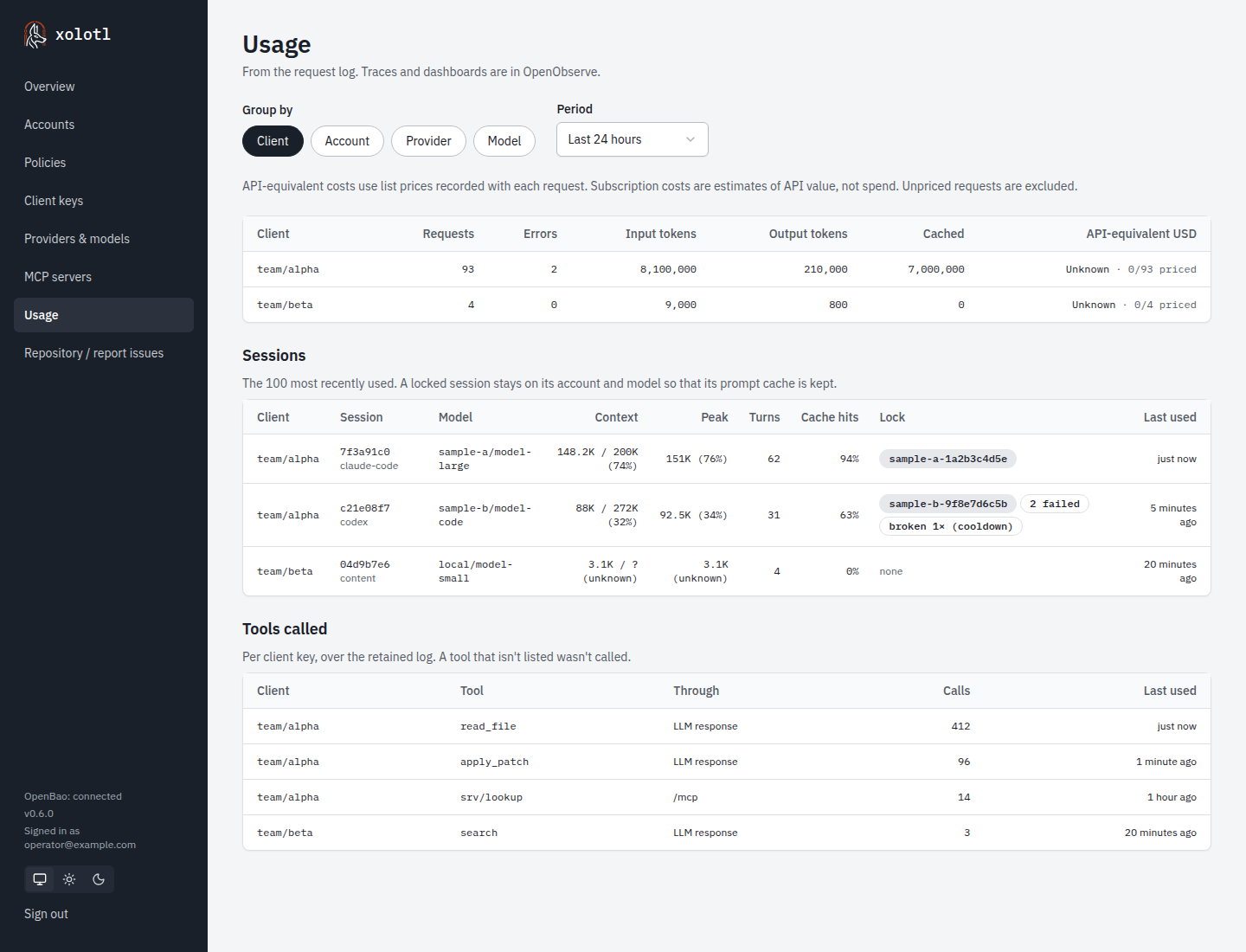
Sessions lists the 100 most recently used conversations: how full each one is against its model’s context window, its peak, its turns, its share of prompt tokens read from cache, and its context lock with any failures and breaks. Tools called lists each tool a key called and how often, so you can remove unused tools from its policy by hand. Both follow the client filter. Tool names are as the upstream sent them: a name that xolotl shortened for a translated request stays shortened.
Models
Every screen that lists models has a Refresh models control. It shows how old the catalog is, and each provider’s model count or discovery error.
- The policy model list refreshes its selected providers, or the provider in the filter. Account views refresh their provider.
- When discovery fails, the cached and static models stay visible with the error. A provider that answers with an empty list shows Provider returned no models.
- Xolotl also discovers models after account changes, provider key changes and
xolotl reload. The UI checks every 30 seconds and updates its lists when that discovery completes.
Theme
The UI has a light and a dark theme. By default it follows the browser’s color scheme. The three buttons above Sign out in the sidebar pick the system, light or dark theme. The browser keeps the choice.
Model catalog rows show context, maximum output, input/output and cache prices per million tokens, with the LiteLLM key or override and last successful fetch age. Failed refreshes retain cached data. Usage and Traffic show API-equivalent USD with priced-request coverage; subscription value is not billed spend.